
Digital Marketing Service List: Essential Services for 2025
If you are a business owner thinking about growing your online presence,you might have heard a lot about digital marketing. But what exactly does it include? And more importantly, which services does your business really need? In this blog, i will break down the key digital marketing service list that every business should consider in 2025.
How to pick the Right Services for Your Business?
Not every company requires all of these services at once. It is actually a matter of your objectives, budget and sector. For instance if someone who owns local store they may be more interested in local seo SEO and social media.
where as an ecommerce business may be spending lots of money on PPC and email marketing. Begin with the essentials, then scale up as your needs grow. working with a digital marketing agency can help you prioritize and get better results without wasting time or money.
1.Search Engine Optimization(SEO).
SEO improves your website’s visibility on Google and similar platforms. Since most people don’t scroll past the first page, ranking well can make a huge difference in how many visitors you get. SEO and digital marketing service list includes things like:
- Keyword research to find what your customers are searching for.
- On-page optimization to make your site easy to understand for search engines.
- Link building to increase your site’s authority.
Without SEO, your site might get lost in the crowd, no matter how good your product or service is,so SEO is the one important digital marketing service list.

2.Pay Per Click Advertising (PPC).
If you need a quick result, you can choose pay per click advertising. than SEO, PPC ads (like Google Ads or Facebook Ads) can help, But you will pay for each click your ad gets, which means you only pay when someone is actually interested. PPC is great for driving traffic, but it does require ongoing management and budget to get the best ROI.
3.Social Media Marketing.
Almost everyone uses social media these days,so it is a great way to reach your audience. Social media marketing involves creating content, posting consistently, running paid ads, and interacting with your followers. Depending on your business, platforms like Instagram, Facebook, LinkedIn or TikTok might be the best fit.It is one of the most needed services in any digital marketing service list,especially for building brand awareness and customer loyalty.
4.Content Marketing.
The main goal of content marketing is to create valuable, engaging, or entertaining content for your audience. Examples include blog posts, videos, and infographics.Good Content:
- Builds trust and authority with your audience.
- Helps improve SEO by targeting the right keywords.
- Encourages visitors to stay longer on your site and return again.
It’s a long-term investment,but it will pays off by attracting steady, organic traffic. That’s why content marketing is a key part of any effective digital marketing service list.
5. Email Marketing.
Email marketing is still one of the best ways to keep in touch with your customers. If it is newsletters, promotions or automated campaigns.Email helps nurture leads and encourages repeat sales. Building a quality email list should be a priority for any business. That’s why web design and development is a necessity for any digital marketing service list.
6.Web Design and Development.
Your websiteis usually people’s first impression of your business, so it needs to work well and look trustworthy. A good website should be:
- Clean and professional in appearance.
- Phone-friendly, as most users access it on their phones.
- Fast loading to keep visitors from leaving.
- Clear calls to action,such as Buy Now or Contact Us, make it easy to navigate.
A small improvement to the design can create a better user experience and more conversions. That’s why web design and development is a necessity for any digital marketing service list.

Conclusion.
Digital marketing is a broad field with many moving parts,but understanding the key services can help you develop a strategy that works for you. If you are starting new or looking to improve your current strategy. Focusing on these core digital marketing service list will help your business to grow and stay competitive in 2025.
If you are ready to take your digital marketing to the next level. Digihertz can help, We are offering customized digital marketing services tailored to your business goals, whether it is SEO, PPC, social media or more.Reach out to Digihertz today, and let’s build a strategy that gets real results.

20 LinkedIn Post Ideas for Social Media Managers
Introduction
As a social media manager coming up with fresh engaging content every day can be a challenge especially on professional platforms like LinkedIn. Whether you are managing your agency’s page your own personal brand or multiple client profiles having a bank of proven LinkedIn post ideas can save time, boost engagement and build authority.
In this blog we are diving into LinkedIn post ideas that work especially well for social media managers. From storytelling formats to engagement-driving tactics these ideas will help keep your LinkedIn content calendar full and your followers interested.
Why LinkedIn Content Matters for Social Media Managers
LinkedIn is no longer just a job-hunting platform. It has evolved into a space for networking personal branding, B2B lead generation and content discovery. With organic reach still strong compared to other social platforms posting consistently on LinkedIn is a great way to build credibility and attract clients or employers.
But consistency only works when paired with creativity. That’s where the right LinkedIn post ideas come into play.
20 LinkedIn Post Ideas for Social Media Managers
1.Case Studies
Share before and after snapshots of campaigns you have managed. Highlight results like increased reach engagement or conversions.

2. Client Testimonials
Got happy clients Turn their reviews into engaging visual posts with quotes or short videos.
3. Advice for Social Media
Quick recommendations about Facebook advertisements, Instagram reels or LinkedIn strategy work effectively especially if they address frequent issues.
4. Behind-the-scenes content
Show the entire content creation process. People enjoy seeing the procedure.
5. Tool Suggestions
Write about the tools you use such as analytics software, design apps or scheduling platforms.
6. Surveys of Engagement
To increase visibility and encourage comments pose questions to your followers such as “What is the most challenging aspect of social media management?”
7. Owning Up to Errors
Posting honestly about your mistakes and lessonslearnt fosters relatability and trust.

8. Updates on the Industry
Notify customers of platform updates or algorithm modifications and the effects they will have on business operations.
9. Brief Instructions
Make brief posts in the form of carousels that outline detailed procedures (such as how to execute a boosted post).
10. File Swipe
Give others ad scripts, caption formulas, or post ideas that others may “swipe” and utilise.
11. Graphics of Before and After
Display the changes you’ve made to social media profiles, such as branding and profile optimisation.
12. Views on Personal Branding
Post your successes, setbacks and lessons learned from being a social media pro if you are in charge of your own business.
13. Introductions of the Team
If you work for an agency, highlight your employees to foster relationships and give the company a more relatable feel.

14. Previews of the Content Calendar
To hint to future campaigns, post previews of your plans for the month.
15. Hashtag Strategy Tips
Share how to build hashtag sets or common mistakes people make using them.
16. Posts of Daily Life
Describe your typical day in the life of a social media manager.
17. Employment Possibilities
Mention that LinkedIn is a fantastic resource for finding partners if you ,are employing or doing freelance work.
18. Audits of Content
If necessary, provide anonymised insights from audits you have completed to demonstrate value.
19. Testing Outcomes
Discuss A/B testing you have conducted such as experimenting with formats or post times.
20. Ideas for Holiday Campaigns
Arrange your pieces in advance and explain how you employ seasonal material to increase interaction.
21. What Do You Have in Your Toolbox?
Look at the content production stack that you favour, such as Canva, Notion and Buffer.
Conclusions
These LinkedIn post ideas can help you fill your schedule with information that engages, educates and fosters trust whether you are managing a number of clients or developing your personal brand. The secret is to switch up your post formats and continue trying to see what appeals to your audience the most.
Need help creating a full LinkedIn strategy and LinkedIn post ideas? At Digihertz, we help brands plan, create and optimize high impact content across platforms including LinkedIn.

Top YouTube Video Idea List for Small Businesses in 2025
YouTube is one of the powerful platform for small businesses to reach new customers.. In youtube making videos helps people get to know your business, trust you and remember your brand. But sometimes, thinking of video ideas isn’t always easy. That is why having a list of YouTube video idea is helpful. It saves time and helps you create better, more focused videos.
In this blog, you will find easy and effective YouTube video ideas that every small business can use in 2025. These ideas focus on connecting with people and growing your brand.
Why should small business be on YouTube?
YouTube is one of the largest platforms. In youtube, where people look for information, products,reviews and services. Being on YouTube helps your small business in many ways.
- Reach more potential customers who prefer watching videos.
- Show your products or services clearly and in action.
- Build trust by sharing your story and expertise.
- Keep your videos online to attract viewers over time.
- Increase the chances of your videos showing up in Google search results.
Videos give you a chance to connect with your audience better than text or photos alone.
Best YouTube Video Ideas List for Small Businesses.
Here are 15 simple and powerful YouTube video ideas to help your small business stand out this year.
1.Introduce Your Business.
One of the great YouTube video idea is to tell your business story to your audience. Share why you started your business and what makes you different from others.This helps people connect with your brand on a personal level.
2.Meet the Team.
Try a YouTube video idea that highlights the team behind your business. Show your team’s faces and personalities so customers feel more comfortable and connected.
3.How-To or Tutorial Videos.
Create a helpful YouTube video idea by teaching something related to your products or services. For example, if you sell baking supplies, a step-by-step cake baking tutorial is perfect.
4.Behind the Scenes.
Behind the scenes is one of the popular youtube video idea to engage a viewers. Show how your business works daily or how your products are made to build trust and interest.

5.Answer Frequently Asked Questions.
Creating videos that answer common customer questions is a helpful YouTube video idea. This saves time and demonstrates your concern for their issues.
6.Special Offers or Announcements.
Make videos announcing sales, new products or special events. This YouTube video idea keeps your audience informed and excited about what is happening.
7.Product or Service Showcase.
Use a clear YouTube video idea to highlight your products or services. Explain benefits and features in a simple way that helps customers understand what you offer.

8.Day in the Life.
Showing a day in the life at your business is a great YouTube video idea. This adds a personal touch and demonstrates your human side of your brand.
9. Tips and Advice.
Sharing useful industry tips with is one of the simple YouTube video idea. It positions your business as an expert and gives real value to your audience.
10.Customer Testimonials.
A strong YouTube video idea is to share your real customer reviews. Hearing positive experiences directly from customers builds trust and this will encourage new viewers to buy your product.

Conclusion
Producing YouTube videos is one of the best ways for small businesses to develop their online presence and audience. The secret is to have clear ideas that resonate with your target audience. Use this list of YouTube video ideas in 2025 to make videos that show your story and build trust. Remember, you don’t need fancy equipment, just be yourself and share what makes your business unique.
If you need help with YouTube marketing or full social media marketing, contact Digihertz your trusted social media marketing partner in Chennai. We will help you create content that connects and grows your business online.
Top 10 Free Backlinks Websites to Boost Your SEO in 2025
Introduction
Backlinks remain one of the most powerful SEO ranking factors in 2025. But building high quality backlinks does not have to cost a fortune. There are many free backlinks website that allow you to create valuable links to your site without spending a single rupee. These websites can help improve your domain authority boost your visibility in search engines, and drive referral traffic.
Here’s our curated list of the top 10 free backlink websites you should use this year to strengthen your SEO strategy.
Websites List
- Medium.com
- Quora.com
- Reddit.com
- Tumblr.com
- LinkedIn.com
- Pinterest.com
- Crunchbase.com
- SiteJabber.com
- About.me
- Google Sites
Medium.com
You can post articles on Medium, a high authority platform, and apply backlinks to your website that are either do-follow or no-follow. It is excellent for increasing topical relevance and repurposing information.
Quora.com
By answering questions relevant to your niche and linking back to your blog posts Quora gives you contextual backlinks and long-term visibility. This free backlinks website is ideal for building trust and traffic.
Reddit.com
Reddit offers niche-based communities (subreddits) where you can share value-added content. While links are usually no-follow high engagement can generate strong referral traffic and domain authority over time.
Tumblr.com
Tumblr is a free Web 2.0 platform that allows you to post multimedia blogs and link back to your main site. It’s user-friendly and great for quick content distribution.

LinkedIn.com
Create articles and posts on LinkedIn with relevant backlinks to your website. Being a trusted professional network links from LinkedIn carry weight and enhance your brand’s online presence.
Pinterest.com
If your business is visual (e.g., food, fashion, fitness), Pinterest is a powerful free backlinks website. Each pin can include a link to your blog, landing page or product page.

Crunchbase.com
Crunchbase allows business profiles where you can list your website blog and social media links. It is especially beneficial for startups and agencies looking to boost trust and SEO.
SiteJabber.com
This is a free review site where users can leave feedback about your services. By claiming your profile and adding links, you get a reliable free backlinks website while improving your brand’s credibility.
About.me
This personal profile builder lets you describe yourself or your business and include links to your main website or portfolio. It’s quick, simple, and provides a high-authority backlink.
Google Sites

Google Sites allows you to create a simple webpage for free. Add optimized content and include free backlinks websites to your main site. Being Google-owned it carries strong indexing power.
Tips to Maximize Results from Free Backlink Websites
- Create unique, relevant content for each website at all times. Avoid links that are ineffective or spammy.
- Seek for websites where people in your target group are active.
- Engage in regular participation by answering questions providing updates and taking part in discussions.
- Google Search Console, Ahrefs and UberSuggest are some tools you can use to keep an eye on your backlink profile.
Conclusion
Using a free backlinks website is one of the smartest ways to boost your SEO especially if you are a startup, freelancer or small business. These platforms offer a cost-effective way to increase your website’s authority visibility and traffic. Consistency and quality are key the more value you add on these platforms, the better results you will get.
If you want help building a backlink strategy tailored for your business, DigiHertz Digital Marketing Agency is here to help you grow smarter and faster.

The Ultimate Off-Page SEO Checklist for 2025
When people talk about SEO, they will usually focus on on page seo and stuff like keywords,titles and content. But off-page SEO is just as important. It helps Google trust your website more and shows that your site is popular and useful. If you want better rankings in 2025 you need to follow a good off page SEO checklist.
In this blog, we will share the most important off-page SEO steps you should do to boost your site’s authority and get more traffic. Don’t worry, it’s easy to follow and you don’t need to be an expert.
What is off page SEO and why is it important?
Off page SEO means everything you do outside of your website to improve website ranking on search engines. This off page seo includes important things like building backlinks and sharing content on social media and getting mentions online. It’s important because Google uses these signals to decide if your website is trustworthy or not.The better your off-page SEO the higher your site can rank.
Key off-page SEO techinques include:
- Obtaining high-quality backlinks from other websites.
- Sharing your content on social media platforms.
- Getting mentions of your brand or site online.
What Is an Off Page SEO Checklist?
An off page SEO checklist includes is a list of task done outside your website to boost its rankings in search engines. This includes building high quality backlinks, promoting your content on social media, getting brand mentions and being listed in local directories. Through these steps,you can show to Google that your website is valuable and trustworthy. Which can help to boost your rankings on google..
Here is the list of top off-page seo checklist
1.Build High-Quality Backlinks.

Backlinks are one of the strongest factors in off-page SEO. A basically backlink is when another website links to your site. Think of it like a vote — the more votes you have from trustworthy sites, the more Google will trust you.
But not all backlinks are equal.Links from bad or spammy websites can harm your site instead of helping it.So focus on getting links from sites that are:
- Trusted and respected in your industry.
- Relevant to your topic.
- Have good traffic and authority.
You can get backlinks by guest blogging, writing helpful articles or sharing your content with others. Even a few strong backlinks can make a big difference and keep in mind that buliding high quality backlinks is one of the most important off page seo checklist.
2. Create Shareable Content.
Try to make your content:
- Easy to read with simple language.
- Interesting and useful content.
- Include images, videos or infographics to explain ideas better.
If your content solves a most common problem problem or teaches something new. people will share it more.Creating shareable content is an important thing you should check off in your off-page SEO checklist.

3. Focus on Local SEO and Citations.
If your business is local. making sure your business information is correct everywhere online.
- Use the same Name, Address, and Phone number (NAP)on Google My Business,Yelp and other local directories.
- Get good reviews from happy customers.
- List your business on trusted local sites.
Focus on local citations is important off page seo checklist if you focus on local businees.
4. Reach Out to Influencers.
Reaching out to influencers is a great step in your off page SEO checklist. basically reaching into influncer can help you get noticed faster by a wider audience.
- Look for influencers in your industry who already have a loyal following.
- Send them a polite message and share your best content.
- Send them a polite message and share your best content.
- Take a soft approach and offer something valuable and see if they’re interested in sharing it.
A single mention from the right influencer can bring a lot of traffic to your website.
5. Participate in Forums and Online Communities
Try to make your content:
- Provide honest and beneficial answers to questions.
- Only include a link to your blog when it’s appropriate and helpful.
- Avoid spamming or merely including links without providing any context.
This builds trust and can slowly improve your off-page SEO and it is one of the important off page seo checklist to add in your list.

Conclusion
Off page SEO checklist may seem a little complicated at first, but it’s actually not that difficult if you follow this off page seo checklist .Simply concentrate on creating valuable content, establishing genuine connections, and remaining active in the areas where your audience spend time most.
This off page SEO checklist can help your website rank higher and get more visitors in 2025.And remember, SEO takes time. Stay patient and be consistent.
Need help with your off page SEO strategy or full SEO service?
Reach out to DigiHertz your trusted digital marketing partner in Chennai. We’re here to help your business grow online.

Top 10 SEO Ranking Factors You Must Focus on in 2025
Introduction
One constant in search engine algorithms is that you must comprehend and optimise for each significant SEO ranking factor element if you want your website to rank highly on Google. The competition is more fierce than ever in 2025, therefore sticking to outdated strategies won’t work.
The top ten SEO ranking elements listed below will significantly affect your search contact this year.
How SEO Ranking Factors in High Quality Content
The most important SEO ranking standards is still content. Original, thoroughly researched, and user-valuable material is rewarded by search engines. To improve your chances of ranking highly in 2025 concentrate on E-E-A-T (Experience, Expertise, Authoritativeness and Trustworthiness).
2. Page Experience & Core Web Vitals
Google prioritizes websites that offer a smooth and fast user experience. Key Core Web Vitals like Largest Contentful Paint (LCP), First Input Delay (FID), and Cumulative Layout Shift (CLS) are critical metrics you can’t ignore this year.
3. Mobile-First Design
With over 70% of users browsing on mobile devices mobile-friendliness has become a non-negotiable SEO ranking factor. Responsive design, fast mobile load speed and easy navigation are must-haves in 2025.
4. Backlinks from Authoritative Sources
High-quality backlinks continue to be important. But now authority and relevance are valued more than quantity. Developing connections with influencers and websites that respond to a particular niche can greatly increase your domain authority.
5. On-Page Optimization
Ensure that all of your headers, picture alt texts, meta descriptions, and title tags are optimised. Don’t pack your material with keywords; instead, use your target keyword naturally such as “SEO ranking factor.”
6. Search Intent Match
Google is now excellent at understanding what users actually want. You must align your content with the intent behind the keyword whether informational, navigational, or transactional to ensure your page is considered a relevant result.
7. Internal Linking Structure
Internal linking helps search engines understand the order and relationship between your pages. It also distributes authority (link juice) across your website making it an important yet often overlooked SEO ranking factor.
8. Secure Website (HTTPS)

Website security affects user trust and rankings. Ensure your website uses an SSL certificate. HTTPS is a lightweight ranking factor but it still contributes to overall trustworthiness in the eyes of search engines.
9. User Engagement Signals
Measures that show how engaging your content is include bounce rate, average time on page, and pages per session. According to Google these are implicit indicators of user pleasure and content quality.
10. Structured Data (Schema Markup)
Using structured data helps search engines better understand your content and display rich snippets in search results. This not only improves contact but also increases click-through rates an underrated SEO ranking factor.

Conclusions
Mastering every important SEO ranking component from backlinks and mobile optimisation to high-quality content, is necessary to stay ahead in 2025. Every component is important for raising your website’s search engine visibility and increasing traffic.
If you are looking for expert support DigiHertz Digital Marketing is here to help.We specialize in tailored SEO strategies that align with your business goals and deliver real results.
Let DigiHertz, handle the SEO so you can focus on growing your business. Connect with us today to get started.

Track Subscriber Count with YouTube Creator Studio
Introduction
As a content creator one of the most exciting and important metrics to monitor is your subscriber count. Whether you are just starting or growing a large audience tracking your YouTube subscriber growth helps you measure your success and refine your content strategy. Thankfully, YouTube Creator Studio offers all the tools you need to track subscriber trends in real-time.
In this blog we will show you how to use YouTube Creator Studio to monitor your subscriber count analyze trends and make informed decisions to grow your channel.
Why Tracking Subscriber Count Matters
Your subscription count is more than just a number it shows how valuable and engaging your content is to readers. Subscribers are more likely to:
- Consistently observe your belongings.
- Get notifications whenever you post new material.
- Boost the YouTube ranking of your videos
Because of this it’s important to monitor subscriber growth if you want to build a loyal audience and effectively market your channel.
Accessing Subscriber Data in YouTube Creator Studio
To start tracking your subscriber count, log in to your YouTube account and head over to YouTube Creator Studio. Here’s how:
- Go to studio.youtube.com
- Choose the Analytics tab from the left-hand menu.
- Select the Audience section
In this panel you will see your current subscriber count, how many subscribers you’ve gained or lost over specific timeframes and other helpful metrics like returning viewers and unique viewers.
Use the Subscriber Graph to Spot Trends
A complete subscription graph can be found under the Audience tab.This tool helps you understand:
- Which days or weeks brought in the most subscribers
- How your subscriber count changes after uploads or promotions
- Whether specific content types attract more subscribers
Use this data to identify content patterns that work and replicate them in future videos.

Advanced Filtering: Daily, Weekly & Monthly Tracking
You can use custom time periods to filter your data in YouTube Creator Studio.You are able to see:
- Number of subscribers per day Excellent for examining short term marketing campaigns or upload effectiveness.
- weekly subscriber trends Good for understanding steady growth or decreases
- Monthly data on subscribers Perfect for long term goal setting and tracking progress over time
This flexibility enables you to align data with your content calendar and marketing campaigns .
Bonus Insights: Subscriber Source Breakdown

Have you ever questioned where you get your subscribers? YouTube Studio displays sources of subscribers such as:
- A search on YouTube
- Recommended videos
- Pages for channels
- Social media or external websites
You can maximise the remaining channels and double down on what’s working if you know which ones are generating the most subscribers.
Tips to Boost Your Subscriber Count
Now that you understand how to keep an eye on your subscriber statistics, here are some tips to help you expand your subscriber base:
- Make use of interesting CTAs: Remind viewers to subscribe at the start and finish of your videos, in particular.
- Post regularly: Frequent uploads develop anticipation and confidence.
- Talk to your audience: To foster a sense of community reply to remarks and pose enquiries.
- Make use of end screens and playlists: Increase your chances that viewers will subscribe by keeping them on your channel longer.
Conclusions
An important performance metric for the health and expansion of your channel is the number of subscribers. You can monitor your numbers, identify trends and develop a more intelligent content plan by using YouTube Creator Studio.
Start tracking your subscriber growth today and take control of your YouTube success. The data is there use it to grow smarter not just bigger.
Best Tools in Instagram for Brands and Small Businesses
Instagram is no longer only for sharing photos. and reels and it is especially Today, it’s a very helpful app for promoting your work, selling products, and building a brand. If you’re a creator, brand, or small business owner, using the right tools in Instagram can help you reach more people and grow faster.
In this blog, we’ll look at the best tools in Instagram and how they can make your work easier and more effective.
Why Business Should Use Tools in Instagram?
If you’re running small business and try to promote your product on Instagram.These tools in Instagram can really help you to grow your business. These tools in Instagram are made to help you work better ,faster and save time.
- Instagram Insights lets you see which posts and stories performing great, so that you can focus on creating content your followers enjoy.
- Scheduling tools like Meta Business Suite and let you plan and post content ahead of time.
- Features like polls ,questions and dm messages help you connect with your audience and build stronger relationships.
These tools save time and help you grow faster. If you want to build your audience, using them is a smart move.
1.Professional Dashboard.
The Professional Dashboard is your control center. It gives you a quick view of your account’s performance. You can:
- Track insights like reach and engagement.
- View your recent promotions.
- Access tips and resources from Instagram.
This tool in Instagram is only available for creator and business accounts..
2.Reels Editing Tools.
Reels are short videos that get a lot of reach. Instagram has built in tools that let you:
- Trim video clips.
- Add trending music.
- Use filters, effects, and stickers.
You don’t need any extra app—these tools in Instagram are simple and useful to edit simple short form video.
3.Instagram Insights.
Insights help you see what content is working and what isn’t. You can check:
- How many people viewed your post or story.
- When your audience is most active.
- you can check who is your audience is (by age, gender, and location).
These tools in Instagram give you the data you need to improve your content strategy.

4.Story Features.
Instagram Stories are great for sharing updates and engaging your audience. Here are some of the best Instagram Story tool:
- Polls and quizzes.
- Countdown timers.
- Question boxes.
This is one of the best tools in Instagram help you interact directly with your followers and keep your content fun and fresh.
5.Instagram Shopping.
If you sell products, Instagram Shopping is one of the best tools in Instagram. It allows you to:
- Tag products in posts and stories.
- Create a shop on your profile.
- Let users purchase without leaving Instagram.
This tool helps small businesses turn followers into customers

6.Saved Replies (Quick Replies).
Saved replies features are a time-saver when your inbox gets busy. You can create shortcodes that insert full messages automatically.
For example:
- Type “/thanks” and send “Thanks for your message! We’ll get back to you soon.”
- This is one of the best tools in Instagram and is great for handling customer support or FAQs quickly.
Conclusion.
Instagram has many built-in tools that can help you grow to your account. In instagram you don’t need to buy expensive software to manage your content or reach more people. The tools in Instagram are easy to use and made for creators, small businesses, and brands.
Make some research exploring these features and finding what is most suitable to you.These tools in instagram can help to get more followers, make better content body, or sell products. The sooner you start using them, the quicker you will get see results.
Not sure where to start your marketing journery? are Feeling stuck or need help growing your brand on Instagram or other platforms, We’ve got you covered. We’re one of the top social media marketing agency in Chennai, and we’re here to help you build your presence and reach your goals step by step.

Top 10 Creative Ideas of Marketing for Small Businesses 2025
Introduction
Creativity is a must for small businesses ideas of marketing for success in the fast-paced digital economy of today. Traditional marketing is insufficient in the face of increased competition and changing consumer behaviour. In light of this we made a list of the ten most creative small business marketing concepts for 2025. The goal of these low-cost strategies is to boost exposure interaction and conversions.
Regardless of how long your small business has been in existence these marketing methods can help you stay ahead of the curve.
Why Make Use of Micro-Influencers?
One of the most economical ideas of marketing for 2025 is collaborating with regional and specialised micro-influencers. These influencers genuine support and highly engaged audience can boost targeted traffic and consumer trust.
Create Short-Form Video Content
The most popular platforms available are stay TikTok, YouTube Shorts, and Instagram Reels.Making short, engaging videos that include customer testimonials or behind-the-scenes footage for your product can do a great job of getting it noticed and heard by many more.
Use Interactive Content
Calculators, surveys, quizzes and interactive infographics are all great ways to improve user experience and build engagement. They are not only fun, but they are also an intelligent way to learn more and build audience understanding.
Invest in Local SEO
If you own a physical business or serve a particular geographic location local SEO optimisation is key. Local backlinks and Google My Business optimisation regional landing pages are effective local marketing strategies.
Run User-Generated Content Campaigns
Ask that customers use your company’s hashtag while sharing their opinions about ideas of marketing your goods or services. Re-sharing user-generated content establishes trust and displays social proof which is highly effective in winning new customers.
Offer Limited-Time Bundles or Flash Sales
Using time-sensitive incentives to create urgency has been shown to increase conversions.To get the most exposure, advertise these packages via social media, SMS and email.
Launch an Email Newsletter with Personalization
One of the best ideas of marketing channels for return investment returns is still email. Use dynamic content blocks, customised subject lines, and carefully chosen content that is pertinent to each reader to make your newsletters more interesting.
Host Local Events or Pop-Up Experiences
Relationships established face-to-face are still worth the value even in the online community. Erecting pop-up tents or organizing neighborhood meetups can increase a business’s visibility and promote word-of-mouth online & offline.
Have Real-Time Conversations with Chatbots
Real-time customer service, lead generation and even product recommendations are made possible by AI-powered chatbots. Its one of the best ideas of marketing show concepts in marketing automation that enhances service and conversion rates.

Repurpose Content Across Channels
Make your contents reach more by converting blog posts to videos, converting videos to carousels, and segmenting webinars into social snippets. This is a recycling technique for content that guarantees consistency while saving time without sacrificing creativity.
Conclusion
Small business ideas of marketing in 2025 demands innovation constancy and flexibility. You can maintain an advantage over competitors and really speak to your audience by adopting such marketing tactics.
All strategies from local search engine optimization and bots to influencer marketing and video content, play a specific role in promoting the growth of your business.
Remember that intelligent use of the right concepts instead of a big budget, is usually the secret to success.
Top Tools for Content Writing that Help Our Clients
When we started writing content for clients, it felt a bit confusing. So many things to do research, write, check grammar, make it sound nice, and also make sure it ranks well on Google. But after trying a bunch of tools for content writing, we found some tools that made our job easier.
In this blog, we will share the tools we use at our digital marketing agency to write better content for our clients. These tools don’t just save time,it help us write smart and clear content that actually gets results.
Why We Need Tools for Content Writing?
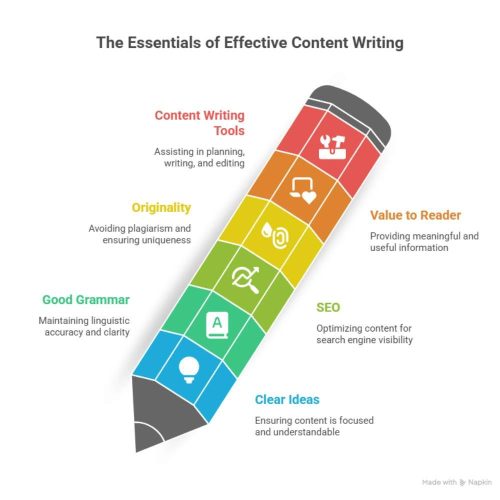
Let me be honest. Writing good content is not just typing whatever comes in your mind. It needs:
- Clear ideas.
- Write in Good grammar and avoid spelling mistakes.
- SEO (search engine optimization).
- No copy-paste stuff.
- And important things provide value to our readers.
Doing all that by yourself every day is definitely not easy. That’s why we need tools for content writing. These tools help us in planning, writing, editing, and even checking if your content is original. These tools don’t replace us . They just make our work better and faster.
What tools do most content writers use every day?
Most content writers use a mix of tools to assist with grammar, editing and keyword research. Grammarly is well-liked for correcting spelling and grammar errors. Google Docs is great for writing and collaborating. Tools like Ubersuggest, Google Keyword Planner and Frase help with SEO and keyword planning and QuillBot helps reword sentences. Canva is also commonly used to design visuals for blog posts or social media.
Here is a list of Tools for Content Writing.
1.Grammarly.

Grammarly is one of the great tools for content writing and it is like a second pair of eyes for content writers. Even if you’re good at English, small mistakes can happen when you’re typing fast. Grammarly shows grammar errors a spelling mistakes, and even tells if your sentence sounds confusing.
- We use it every day while writing blogs, captions and everything.
- It catches small errors that we miss.
- Suggests better words or sentence structure.
- Helps to keep the tone professional but easy to read.
2.Hemingway Editor.
This tool is great when you want your writing to be super clear. It shows if a sentence is too long or hard to read. If your blog is full of complicated lines, people will leave quickly. Hemingway helps fix that.
- Highlights complex and passive sentences.
- Shows reading level (we aim for Grade 5–7 for blogs).
- Makes the content easy for everyone to understand.
- We paste the blog here before publishing to make sure it’s clean and clear.
3.Google Docs.
We honestly can’t work without Google Docs. It’s simple but powerful.
- All team members can edit together.
- Autosaves everything — no worries about crashes.
- Easy to comment, suggest edits, and share with clients.
- it’s a cloud-based system, so we can work from anywhere.
Google Docs is a must have tools for content writing, especially if you’re new to content writing.
4.Ubersuggest.
Before writing a blog, we need to know what people are actually searching for. Ubersuggest helps us find that. It shows keyword ideas, search volume, and even tells what your competitors are ranking for.
- It help us to find easy keywords with good search volume.
- Get blog topic ideas.
We use it before starting any blog to plan the content properly.
5.Frase.io.
Frase is a very helpful tool for SEO. It shows what the top 10 search results are saying, so we don’t miss anything important.
- Helps build blog outlines faster.
- Tells which keywords to include.
- Checks how optimized your blog is compared to others.
It’s like a shortcut to writing smart and SEO-friendly blogs.
6.QuillBot.
QuillBot is one of the top tools for content writing. it helps us reword sentences without changing the meaning. Sometimes, we write a sentence that sounds “okay,” but QuillBot gives us a better version.
- Great for rewriting or improving weak sentences.
- Has different modes: formal, simple, and creative.
- Also useful for repurposing content (like blogs into captions)
But we don’t let it write everything we just use it to improve lines.
Conclusion.
These are the tools for content writing we use every day. When we create content for our clients or content for ourselves. We didn’t start with all of the content writing tools. We slowly tried and explore each one and kept the ones that actually helped.
So whether you’re a writer, business owner or even just getting started in digital marketing and give some try of these tools for content writing. This tool really make your writing easier, faster and better.
Need help with content or SEO? We are DigiHertz, your digital marketing partner in Chennai, are always happy to help. Whether it’s content writing, planning, or doing a full SEO audit. You can reach out to us anytime.and We are always here to help you.


